
How AI Smart Glasses Work and What Makes Them Different
Technology is moving beyond phones, laptops, and smartwatches. One interesting development is AI Smart Glasses, which combine everyday eyewear with digital tools. They can help people take pictures, listen to information, ask questions, and use certain AI features without holding a phone.
These glasses look similar to regular eyewear, but small electronic parts make them more useful. Their abilities depend on the model, software, and connected services. Some focus on voice commands and cameras, while others can show digital information in front of the wearer’s eyes.
In this guide, we will explain what AI smart glasses are, how they work, what people can do with them, and which things to check before buying a pair.
- What Are AI Smart Glasses?
- How Do AI Smart Glasses Work?
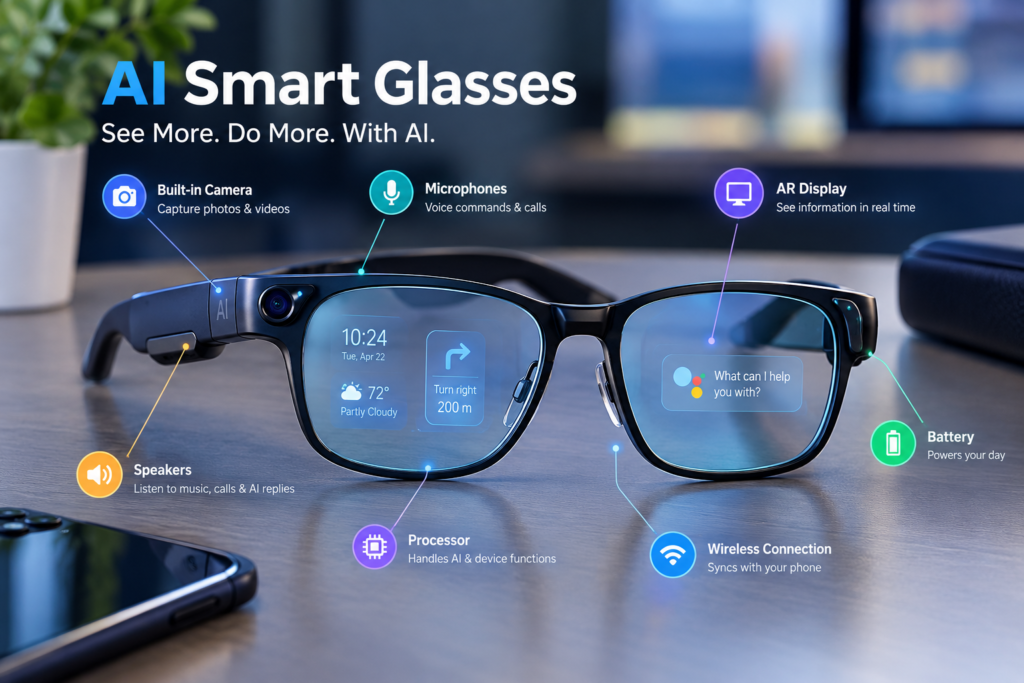
- Important Parts Inside AI Smart Glasses
- Main Features of AI Smart Glasses
- Everyday Uses of AI Smart Glasses
- Can AI Smart Glasses Help With Learning?
- Benefits and Limitations of AI Smart Glasses
- Privacy and Safety Considerations
- AI Smart Glasses vs Regular Glasses and Smartphones
- What to Check Before Buying AI Smart Glasses
- Final Thoughts
- Frequently Asked Questions
What Are AI Smart Glasses?
AI smart glasses are wearable devices that bring selected digital features into a pair of glasses. They may include a camera, microphones, speakers, wireless connections, and an AI assistant. These parts allow users to interact with technology while keeping their hands free. You will find more helpful articles about AI tools, smart gadgets, and emerging technology on GadgetHere.
For example, someone may ask a supported assistant a question, take a photo, listen to a reply, or get help understanding something in front of them. The exact features depend on the product. Not every smart glass model uses artificial intelligence. Some offer basic audio, calls, or notifications, while AI-powered models can perform more advanced tasks.
How Do AI Smart Glasses Work?
AI glasses collect information through their built-in hardware and use software to respond to the wearer. A voice command may start the process, or the user may press a button to take a picture.
The glasses then handle the request using their own electronics, a connected phone, an online service, or a combination of these. For example, a supported AI assistant may examine a captured image and provide an answer.
The reply may come through small speakers or appear on a lens display if the model has one. This process can feel simple to the user, even though several parts work together behind the scenes.
Important Parts Inside AI Smart Glasses
Camera
The camera captures photos or videos on models that have this feature. It can also help the AI system understand images when visual assistance is supported.
Microphones
Microphones pick up voice commands, phone calls, and spoken questions. They allow users to interact with supported AI assistants without typing.
Speakers
Small speakers play music, phone calls, navigation directions, and AI replies. This lets users hear information without using headphones on compatible models.
Processor
The processor handles the glasses’ basic operations and some computing tasks. Its power and design can affect how quickly certain features respond.
Wireless Connection
Wireless technology connects the glasses to a smartphone or other supported services. Depending on the model, Bluetooth, Wi-Fi, or an internet connection may be needed for different functions.
Battery
The battery provides power to the camera, microphones, speakers, and other electronic parts. Battery size and usage affect how long the glasses can operate before needing a recharge.
Controls and Sensors
Buttons, touch controls, and sensors help users operate the glasses. Depending on the model, they may support actions such as starting a recording, adjusting audio, or detecting certain movements.
Main Features of AI Smart Glasses
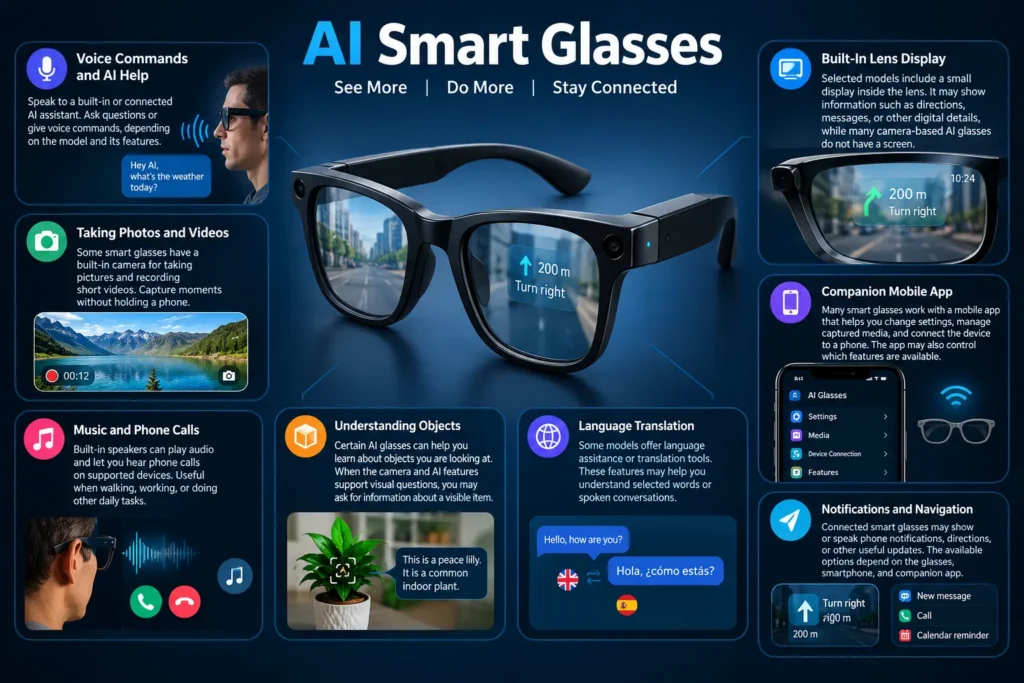
Voice Commands and AI Help
Many AI smart glasses let users speak to a built-in or connected AI assistant. You can ask simple questions or give voice commands, depending on the model and its supported features.
Taking Photos and Videos
Some smart glasses have a built-in camera for taking pictures and recording short videos. This allows users to capture moments without holding a phone.
Music and Phone Calls
Built-in speakers can play audio and let users hear phone calls on supported devices. This feature can be useful when walking, working, or doing other daily tasks.
Understanding Objects
Certain AI glasses can help users learn about objects they are looking at. When the camera and AI features support visual questions, users may ask for information about a visible item.
Language Translation
Some models offer language assistance or translation tools. These features may help users understand selected words or spoken conversations, but language support can vary by device.
Notifications and Navigation
Connected smart glasses may show or speak phone notifications, directions, or other useful updates. The available options depend on the glasses, smartphone, and companion app.
Built-In Lens Display
Selected models include a small display inside the lens. It may show information such as directions, messages, or other digital details, while many camera-based AI glasses do not have a screen.
Companion Mobile App
Many smart glasses work with a mobile app that helps users change settings, manage captured media, and connect the device to a phone. The app may also control which features are available.
AI smart glasses do not all offer the same tools. Check the manufacturer’s specifications before buying to confirm which features are included in the model you want.
Everyday Uses of AI Smart Glasses
AI glasses may be useful in situations where reaching for a phone is inconvenient. They can bring selected digital functions closer to the user while keeping the device on their face.
For example, a traveller might use a supported assistant to ask a question, while a person walking outdoors may take a hands-free picture. Someone working at a desk could use voice controls for calls or audio.
Other uses may include listening to directions, checking selected notifications, or getting help with a simple task. These examples depend on the model and available software.
They are not a replacement for every phone feature. Their value comes from making certain actions easier in suitable situations.
Can AI Smart Glasses Help With Learning?
AI smart glasses may support learning when their software offers useful information in a convenient format. A learner could ask a question aloud, listen to an explanation, or capture an image for a supported AI tool to examine.
Some models may help with language practice, short explanations, or hands-free audio learning. A display-equipped device may offer additional visual information if its software supports it.
Still, these glasses should not be treated as a source of guaranteed correct answers. AI systems can misunderstand questions, miss visual details, or provide inaccurate information. Students should verify important facts and follow school rules about recording, examinations, and device use.
Benefits and Limitations of AI Smart Glasses
| Benefits | Limitations |
|---|---|
| Hands-Free Use: Users can access supported tools without taking out their phones. | Battery Life: Frequent use of cameras and AI tools may drain the battery quickly. |
| Multiple Functions: Some models combine calls, audio, photos, and AI help in one device. | Phone or Internet Needs: Certain features may require a connected phone or internet access. |
| Easy Daily Tasks: Voice commands can make some activities simpler while walking or travelling. | Feature Differences: Available tools may vary by model, country, and language. |
| Modern Design: Some styles look similar to regular glasses and suit daily wear. | Comfort Issues: Frame size, weight, and prescription needs may affect comfort. |
| Quick Information: Models with displays can show selected details directly in the user’s view. | Extra Costs: Some features may require paid services, and recording or storage options may be limited. |
Privacy and Safety Considerations
Privacy is an important part of using camera-equipped eyewear. Because the camera sits on the frame, people nearby may not always know when a photo or video is being captured.
Before using AI smart glasses, learn how the recording controls work. Check whether the device has a recording indicator, how captured files are stored, and whether images or audio may be sent to an online service.
AI Smart Glasses vs Regular Glasses and Smartphones
Regular glasses mainly help with vision, sun protection, or personal style. They do not normally include electronic features unless they are designed as smart eyewear.
AI smart glasses add selected digital functions to the frame. Depending on the model, they may offer audio, cameras, voice interaction, or a small display.
Smartphones remain more suitable for many tasks because they have larger screens, more detailed controls, and broader app support. Reading long documents, editing photos, and entering large amounts of text are usually easier on a phone or computer.
The two devices can work together rather than compete directly. Smart glasses may handle quick, hands-free actions, while the phone remains useful for tasks that need a larger display or more detailed input.
What to Check Before Buying AI Smart Glasses
Before choosing a pair, think about how you plan to use it. A model made for music and calls may not offer the same tools as one designed for camera-based AI assistance.
Use this checklist to compare your options:
| What to check | Why it matters |
|---|---|
| AI features | Confirms what the assistant can actually do |
| Phone compatibility | Helps ensure the glasses work with your device |
| Battery life | Shows how long they may last between charges |
| Camera quality | Matters for photos and supported visual tasks |
| Audio quality | Affects calls and spoken responses |
| Display | Determines whether information can appear in the lens |
| Comfort and fit | Helps with longer periods of use |
| Prescription support | Important for people who need corrective lenses |
| Privacy controls | Explains how recording and data are managed |
| Price and extra costs | Helps you compare total ownership costs |
Final Thoughts
AI smart glasses bring selected digital tools into everyday eyewear. They can make certain tasks more convenient by combining voice interaction, audio, cameras, and sometimes a display in a wearable design.
Their usefulness depends on the features available, how well the software works, and whether the device fits your daily routine. Before choosing a pair, compare the specifications, understand the privacy settings, and check any phone or internet requirements.
As wearable technology develops, AI glasses may offer more ways to interact with digital information. For now, the best choice is a model that meets your real needs without promising more than it can deliver.
Frequently Asked Questions
What do AI smart glasses actually do?
Depending on the model, they can support voice commands, calls, audio playback, photos, selected AI questions, or information displayed in a lens. Not every device includes all these features.
Do AI glasses need the internet?
Some basic functions may work offline, but online AI responses, cloud-based image analysis, and certain connected services may require internet access. Check the requirements for the specific model.
Can AI smart glasses take photos and videos?
Some models have built-in cameras for hands-free capture. Others may not include a camera, so always check the product specifications and recording controls.
Are AI smart glasses the same as augmented reality glasses?
Not always. smart glasses may provide voice-based assistance without a screen. Augmented reality glasses generally focus on placing digital information within the user’s view, although product designs can overlap.